
What is headless ticketing?
Headless ticketing separates the customer-facing ticket-buying interface from the software that manages ticket inventory, reservations and orders. A business can design its own website or app while communicating with the underlying ticketing services through APIs or other supported interfaces. The backend remains responsible for authorised booking operations, even when the customer never sees the backend provider’s website.
Headless is an architectural choice, not a guarantee of unlimited customisation. The degree of control depends on which operations the ticketing provider exposes, who can access them and how the organisation chooses to implement checkout and payments.
How does headless ticketing work?
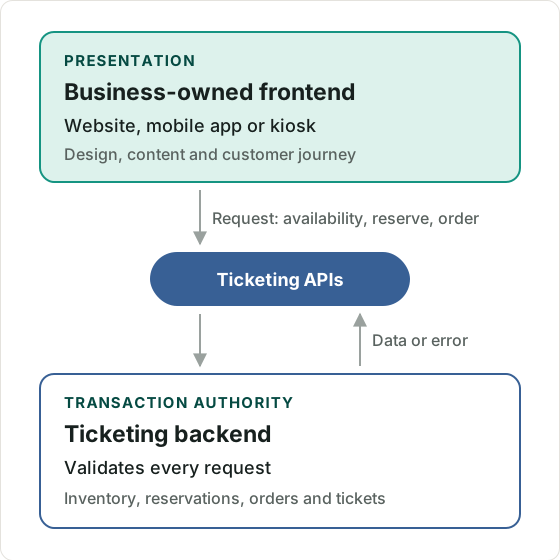
A headless ticketing system exposes ticketing functions independently of a predefined storefront. The frontend asks for information or requests an operation; the backend validates the request and carries out the permitted action.
A typical customer journey can involve:
- A custom website retrieves event, date and price information from a ticketing service.
- The visitor selects a date, ticket type or seat using the organisation’s interface.
- The application requests live-enough availability for display, then asks the backend to reserve or prepare the selected items using the provider’s booking workflow.
- The customer completes identity, attendee-details and payment steps in a supported flow.
- The backend confirms the order, updates inventory and issues the relevant tickets or entitlements.
The key architectural boundary is between presentation and transaction authority. The frontend can show a seat as selectable, but the ticketing service must still determine whether it can actually be reserved. Two people may see the same last seat before either has committed to a purchase.
Illustrative example: A sports club builds its own membership app. Supporters see fixtures, personalised ticket offers and seating choices in the club’s design. A specialist ticketing system manages seat availability and purchase records behind the scenes. The app controls the presentation; the booking system remains responsible for enforcing availability and entitlement rules.
What parts of a ticketing experience can be headless?
The answer depends on the interfaces available. A business might control the entire booking frontend or only part of it.
Not every headless provider exposes all five layers. Some expose read-only event data but provide a hosted payment flow. Others offer transactional APIs for reservations and orders. The label headless alone does not establish which approach is available.
How is headless ticketing different from embedded and white-label ticketing?
Headless, embedded and white-label ticketing describe different aspects of the system.
- Headless describes separation between the frontend and the underlying ticketing services.
- Embedded describes placing ticket functionality inside an existing website or app, commonly through widgets, frames or components.
- White-label describes the customer-facing brand under which the service is presented.
A theatre can embed a provider’s ready-made checkout inside its own website without building a headless frontend. Equally, a ticketing company can build a completely custom frontend against APIs, brand it as its own service and still rely on a supplier for transaction processing.
A hybrid pattern is also possible: an external app owns event discovery and selection, prepares a basket through an API, then sends the customer into the provider’s existing checkout. This avoids recreating payment and order-management screens, although it is not a fully custom headless checkout.
What are the benefits of headless ticketing?
The main benefit is flexibility over the customer experience without having to build every underlying ticketing function. That can matter when ticket purchasing must fit a larger digital service, rather than stand alone as a separate ticket shop.
An organisation may be able to combine tickets with membership access, design a custom user journey or reuse the same backend across several customer-facing channels. Existing product teams can develop interfaces consistent with their design system instead of accepting an inflexible storefront.
Headless architecture may also permit gradual change: the organisation can redesign its frontend without replacing the ticketing backend, provided the interfaces and commercial arrangements remain compatible.
These benefits come with qualifications. A custom frontend creates a development and maintenance obligation. It does not automatically improve conversion, reduce costs or change who controls customer data.
What are the risks and limitations?
Headless ticketing transfers additional responsibility for the customer-facing application to the organisation building it. Poorly designed integrations can produce inaccurate availability, inaccessible selection screens or confused payment states even when the underlying ticketing platform is reliable.
Important considerations include:
- Reservation integrity: reading availability does not reserve a ticket; only an authorised booking operation can do that.
- Changing inventory: another sales channel may sell a ticket between browsing and reservation.
- Authentication: the frontend must not grant users or integrations more access than they are entitled to.
- Payments: card-data handling and merchant responsibilities depend on architecture, processor contracts and jurisdiction.
- Resilience: API failures, timeouts and repeat requests need deliberate recovery behaviour.
- Accessibility: custom seat maps, forms and modal checkouts must be usable with keyboard and assistive technologies.
A custom journey can create a worse experience than a mature hosted checkout if those details are neglected.
When does headless ticketing make sense?
Headless ticketing is most useful when owning a differentiated customer experience is worth the extra integration and frontend responsibility.
An established ticketing platform, membership organisation, entertainment group or enterprise application may already have a product team, existing identity system and distinctive service requirements. Those organisations have reasons to separate frontend design from booking infrastructure.
For a small organiser with conventional ticket sales, a configurable hosted checkout can be faster, cheaper and easier to maintain. A prebuilt embedded component may also provide enough control without needing a full headless build.
The decision should begin with a concrete list of experiences the organisation needs to control—not with the assumption that headless is inherently more advanced or better.
What should developers check before choosing headless ticketing?
Ask for a demonstration of the actual journey, not just an API list. Can the application discover events, obtain seating information, reserve inventory, confirm orders, manage refunds or handle transfers? Which functions remain available only through hosted components or administration screens?
Check how credentials and permissions work, whether sandbox environments and API change notices exist, and how the provider manages retries, concurrent reservations and high-demand onsales. Test the failure paths as carefully as the successful purchase path.
A sound headless integration has a clear boundary: the frontend owns the intended experience, while the ticketing system remains the authoritative source for ticket validity and transactional state.